MSPs can now define their own support ticket pipeline - configure stage names, order, automations, and SLAs per workspace. No longer constrained by a one-size-fits-all default flow, NOC teams, help desks, and project shops can each model their unique workflow. Sensible defaults are provided out of the box, with full customization available in workspace settings.
OpenFrame v0.9.19 - Mingo AI Expansion & Custom PSA Stages
Version: 0.9.19
AI AGENTSAI HELP DESKMINGOMSP AUTOMATIONPSATICKETING
MAJOR
Release Type
BETA
Release Status
June 10, 2026
Release Date

Michael Assraf
Author
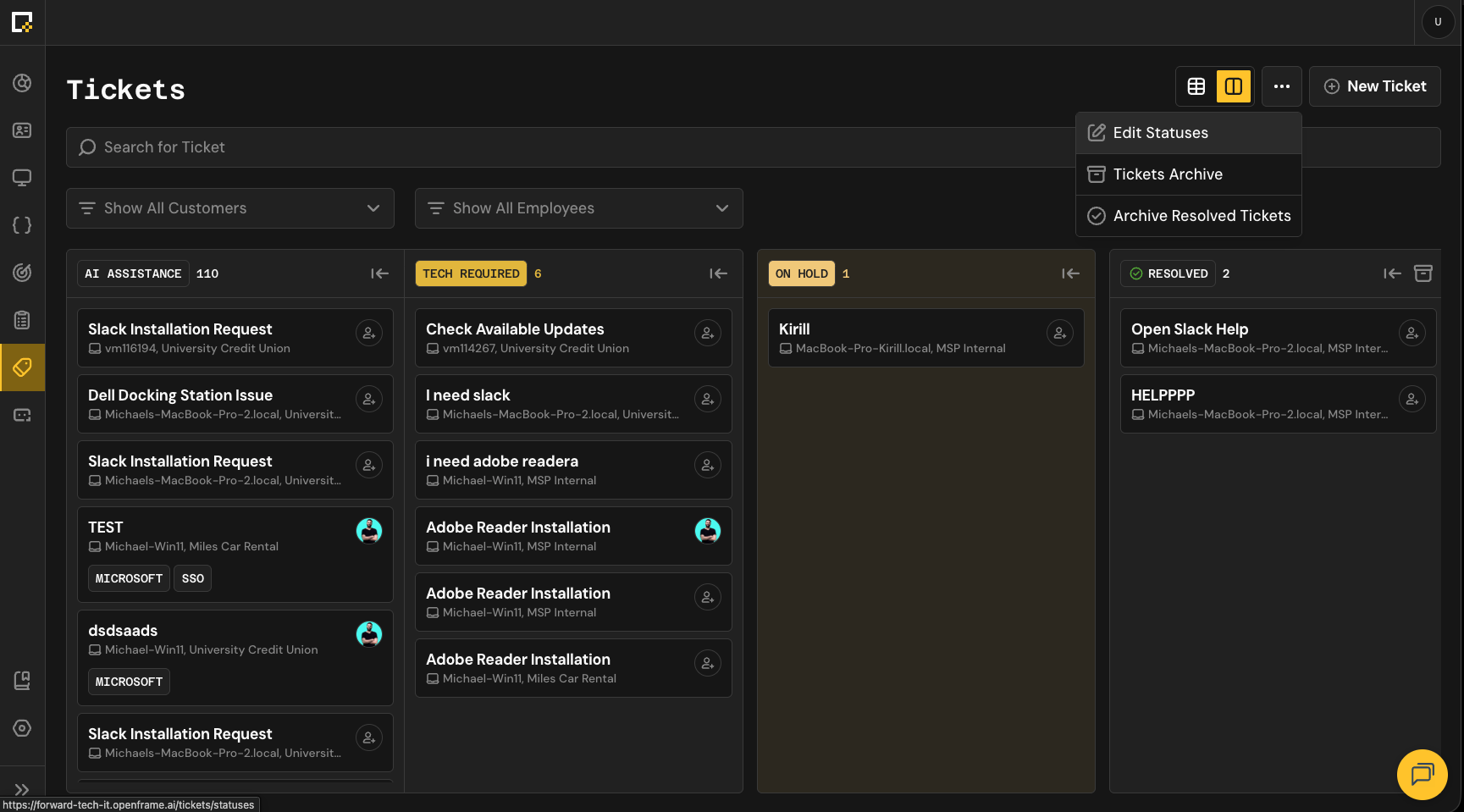
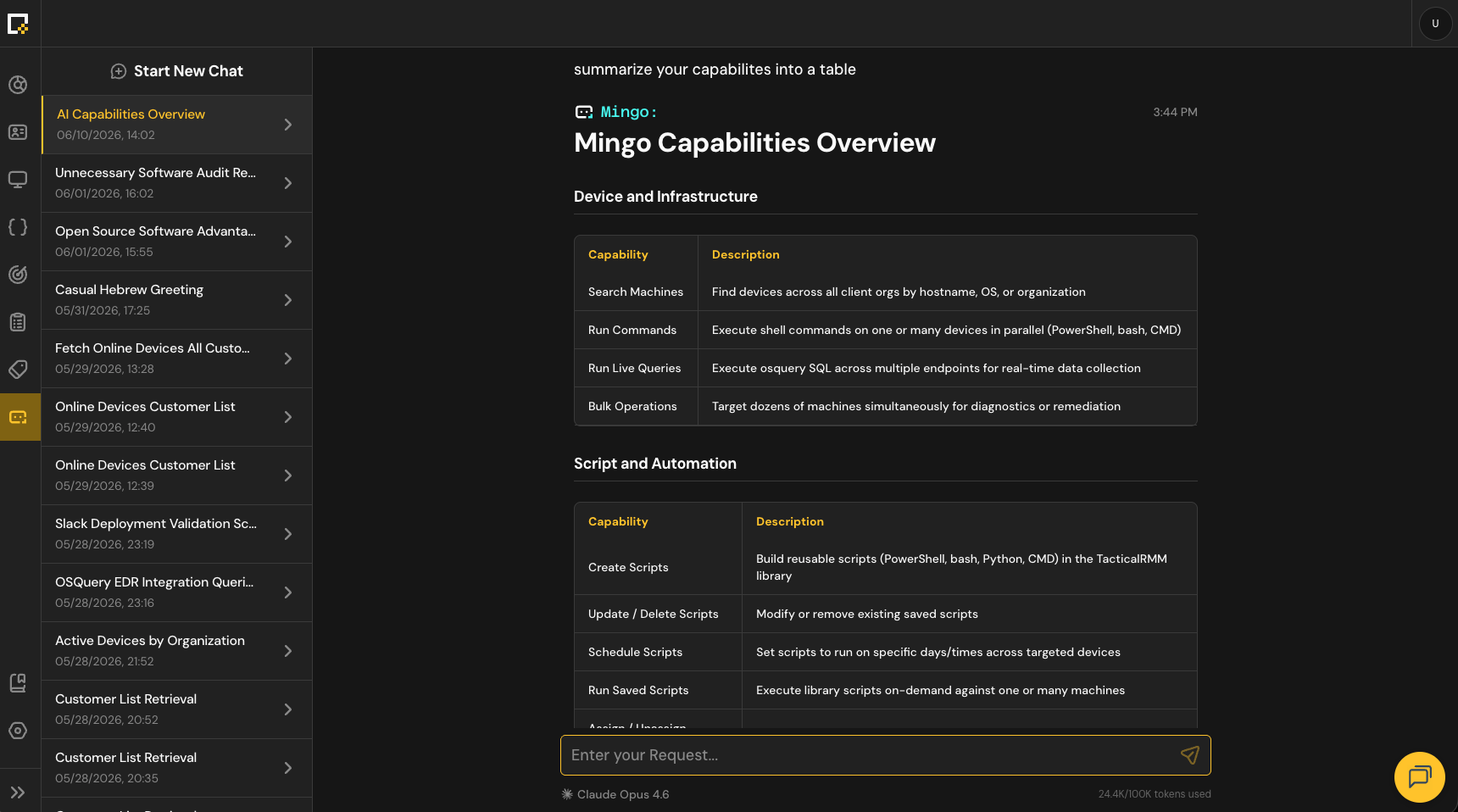
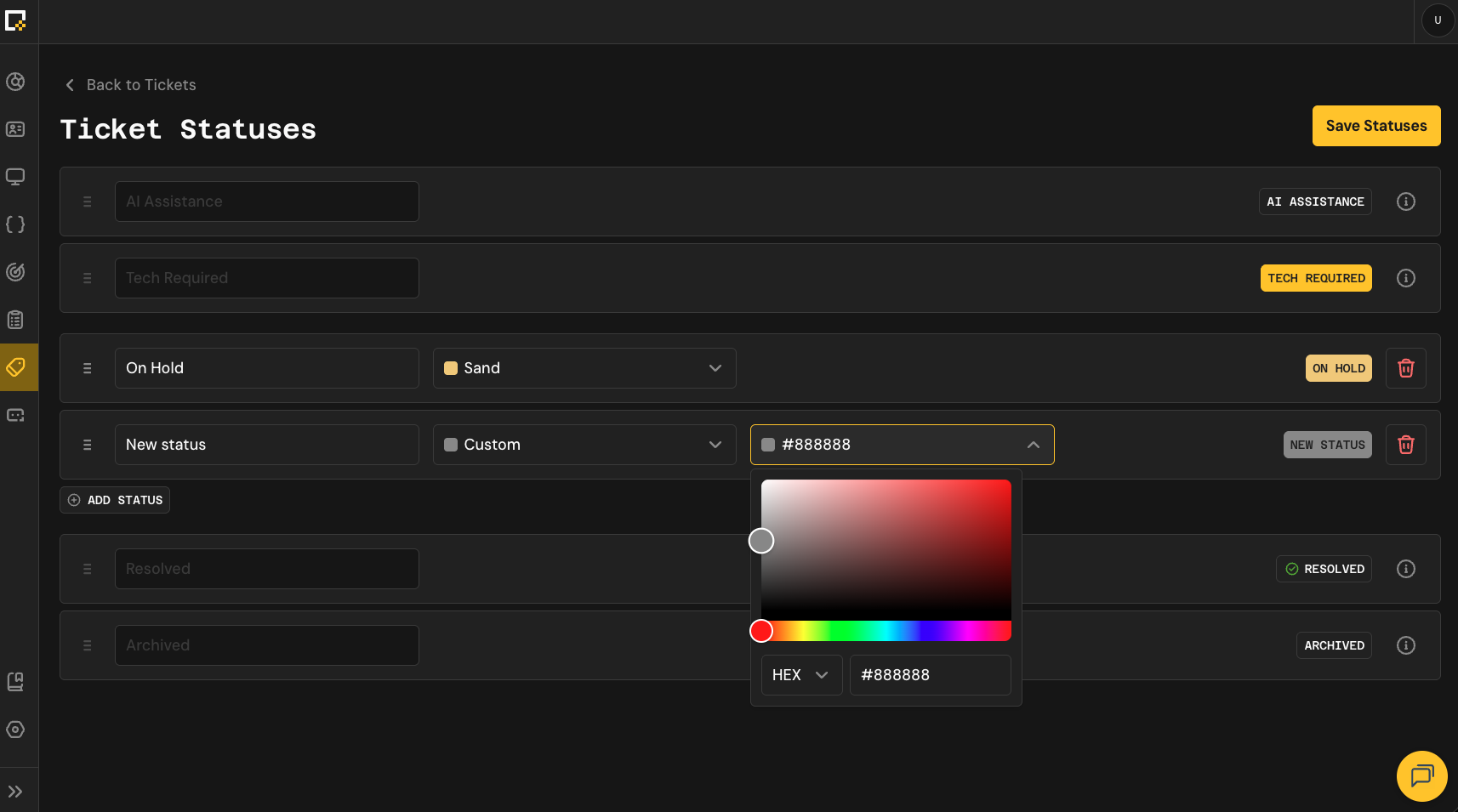

OpenFrame v0.9.19 delivers a major leap in Mingo AI capabilities - expanding the assistant's reach across scripts, policies, queries, knowledge base, tickets, and device organization queries - giving MSP technicians true end-to-end automation from a single chat prompt. This release also ships the long-awaited custom ticket pipeline stages feature, letting every MSP define their own support workflow with configurable stage names, order, automations, and SLAs. Backed by deep infrastructure improvements including Cassandra and MongoDB multi-tenancy migrations, Redis consolidation, and NATS JetStream adoption, v0.9.19 lays a more scalable foundation for the platform's next phase.
Features Added13
Custom Ticket Pipeline Stages (PSA)
Mingo: Query Devices by Organization Name
Mingo now supports filtering and acting on devices scoped to a specific customer organization. Technicians can issue natural-language commands like 'Reboot all devices for Acme Corp' or 'Show offline devices for Contoso' - Mingo resolves the organization name and scopes the action accordingly.
Mingo: Script, Scheduled Script, Query, and Policy API Integration
Mingo now exposes full CRUD access to Scripts, Scheduled Scripts, Queries, and Policies. The assistant can list, retrieve, create, and edit these entities, enabling AI-driven automation across the core RMM building blocks without leaving the chat interface.
Mingo: Lifecycle Tools for Queries, Policies, and Scripts
Beyond creation, Mingo can now assign entities to machines, execute them, and clean them up - completing the full automation lifecycle in a single prompt chain. This unblocks real end-to-end automation scenarios that previously required manual UI steps between each action.
Mingo: Lifecycle Tools for Knowledge Base and Tickets
Mingo gains read and write access to Knowledge Base articles and Tickets. Technicians can search KB articles, retrieve them by ID, create new articles, and perform ticket operations - all from a single prompt. Example: 'Find all unassigned tickets older than 30 days and close them.'
Mingo: Partial Thinking Visible in Chat UI
Mingo's internal reasoning is now surfaced in the chat interface, giving administrators transparency into how the assistant arrives at its responses. Thinking output is also included in the LLM context for subsequent turns, allowing the model to build on its own prior reasoning across a conversation.
Mingo: Batch Approval for Multiple Tool Calls
When Mingo generates multiple tool calls in a single turn, all actions requiring approval are now grouped into a single approval request. Tools that do not require approval proceed immediately, while the user reviews and approves the full batch at once - eliminating repeated approval interruptions.
Mingo: Send Messages While Approval Is Pending
Users can now send new messages to Mingo while an approval request is pending. This allows technicians to redirect the assistant, correct a mistake, or cancel the current direction without being forced to interact with the approval UI first.
Web Search as a Dedicated Sub-Agent Tool
Web search has been moved out of the main LLM assistant loop and into a dedicated sub-agent tool. This eliminates context spikes caused by web search tokens being billed as plain input tokens, reduces premature context truncation, and makes web search a controlled, explicit capability rather than an implicit one.
Fullscreen Mode for Remote Connection Viewer
MSP technicians can now expand the remote connection session to fullscreen using a dedicated toggle in the viewer toolbar. The Fullscreen API is used to take over the entire screen, removing the OpenFrame UI chrome during active troubleshooting sessions.
Installation Doctor Mode
A new /doctor mode for the installer performs pre-flight checks before installation - verifying antivirus whitelisting, DNS filtering, admin rights, write privileges, file download capability, and WebSocket connectivity. Results are reported to the user and logged via an unauthenticated API endpoint.
OpenFrame Client Survive Reinstall
Devices now support soft reinstallation - the existing device ID is reused across consecutive installations, preventing duplicate device entries and preserving device history when the client is reinstalled.
Proxy Gateway for OpenFrame Hub Routing
A Spring Gateway proxy now sits between the React frontend and the OpenFrame Hub chat backend. The gateway injects authentication and identity headers (Authorization and X-Chat-Act-As) on every proxied request, centralizing auth enforcement and decoupling the frontend from direct hub access.
Bugs Fixed20
Remote Access UK Keyboard Layout - @ Symbol Mapped Incorrectly
When using remote access with a UK keyboard connecting to a UK machine, the @ symbol was outputting ~ instead. The remote session was interpreting input as US layout rather than UK. Keyboard layout mapping has been corrected.
Deleted Devices Visible on Customer Devices Page
The device list on the Customer details page was showing deleted devices, while the main Devices page correctly hid them. Both pages now consistently filter out deleted devices, showing only online, offline, pending, and archived statuses.
Ticket Statistics Bleeding Across Tenants
Ticket statistics were not properly isolated between tenants - metrics such as open/closed counts and resolution times could bleed across tenant boundaries. All ticket stat queries are now scoped by tenantId and dashboard widgets reflect only the current tenant's data.
Log Details Shows Static Timestamp Without Time Zone Conversion
On the Log Details screen (script schedule execution history), timestamps were displayed as static values without converting to the user's local time zone. The same time zone conversion logic used elsewhere in the app is now applied.
Loki Overload - Slow or Timing Out Log Queries
Loki was overloaded by the volume of incoming logs, causing queries to be slow or time out. Retention policies have been tuned, ingestion limits adjusted, noisy log sources reduced, and storage optimized.
Logs Functionality Stops Working
Logs functionality was intermittently stopping entirely in production. Root cause has been investigated and a hotfix applied.
Mesh Agent Certificate Update Issue
Mesh agent certificate updates were failing. The issue has been identified and resolved.
Fleet Enrollment or Config 401 Unauthorized Error
Fleet enrollment and configuration requests were returning 401 errors. The authentication issue has been resolved.
NATS Auth Timeout
NATS authentication was timing out under certain conditions. The timeout issue has been fixed.
Race Condition: Sync Between Tool Update and Client Update
A race condition existed between tool state updates and client-side updates, causing inconsistent state. The synchronization issue has been resolved.
AI Fails to Create Large Scripts
Mingo was failing when attempting to create scripts above a certain size threshold. The issue has been fixed to support large script creation.
Aggressively Started Direct Chat Mid-AI Generation
Starting a new direct chat while AI generation was in progress caused a mismatch between executing and executed tool states. The synchronization between concurrent chat interactions and active generation has been corrected.
Fix Mingo Message Pagination and List Load
Mingo message pagination was broken and the message list was not loading correctly. Both issues have been resolved to ensure conversation history loads and paginates reliably.
Customer Avatar Images in Device Details - Incorrect Crop
Customer/organization avatar images in the Device Details section were not rendering as squares. Fixed to ensure consistent square dimensions and proper cropping.
Dashboard Block Hover States Incorrect
Dashboard blocks were using incorrect hover state colors. Hover states now match the design system gray colors. The onboarding block hover state has been removed entirely since it has no click action.
Image Cache Not Invalidated on Upload
After uploading a new image (profile picture, organization logo), the old cached version continued to display until a hard refresh. Image cache is now invalidated on upload so the new image appears immediately.
Pre-Select Customer When Adding Device from Customer Section
Clicking 'Add Device' from within a customer's section was defaulting the customer dropdown to the default organization instead of pre-selecting the customer being viewed. The customer context is now passed correctly.
Fleet Old Dependencies Incompatible With New macOS System Architecture
Fleet dependencies were incompatible with the new macOS system architecture. Dependencies have been updated to restore compatibility.
Installation Over Older Devices - Stale Agent Lock
Stale or zombie agents left from previous installations were causing Fleet Orbit database lock issues when reinstalling. The installation process now handles pre-existing agent state correctly.
Fix Mesh Reinstall on Windows
Mesh agent reinstallation on Windows was failing. The reinstall process has been fixed.
Improvements26
Mingo: Chat Chunk Catch-up Migrated from Redis to NATS JetStream
The mechanism for catching up on message chunks when a client reconnects or joins mid-generation has been moved from a Redis-backed REST endpoint to NATS JetStream. This eliminates synchronization edge cases, removes the need for the frontend to reconcile chunks from two sources, and simplifies the overall streaming architecture.
Custom Ticket Stages - Full Backend State Machine and Frontend Management UI
The custom ticket stages feature ships with a strict backend state machine as the single source of truth for all ticket transitions, plus frontend surfaces for technicians (ticket view controls) and admins (workspace status settings screen). The backend validates every transition and the frontend surfaces errors clearly.
Cassandra Migrated to Shared Keyspace with tenantId
Cassandra has been migrated from a keyspace-per-tenant model to a single shared keyspace where tenant isolation is enforced via a tenantId field on each entity. This consolidates tenant data, simplifies schema management, and reduces operational overhead.
MongoDB Migrated to Shared Database with tenantId
MongoDB storage has moved from a separate database per tenant to a single shared database where documents are distinguished by a tenantId field with proper indexes. This simplifies infrastructure, reduces database sprawl, and makes schema migrations easier.
Fleet Redis Consolidated to Shared Deployment with Key Prefixing
Fleet Redis deployments have been merged into a single shared Redis instance. Per-tenant key prefixes (fleet:) are applied to namespace data per service and prevent key collisions, reducing infrastructure overhead and simplifying maintenance.
MeshCentral MongoDB Migrated to Shared with Multi-Tenant Domains
Mesh MongoDB has been moved from per-tenant clusters to a shared deployment. All tenant MeshCentral instances are configured as multi-tenant domains, consolidating the data layer.
Debezium Migrated to Shared for MeshCentral
Debezium connectors for MeshCentral have been migrated to the shared cluster, aligning with the broader infrastructure consolidation effort.
Versioned Debezium Connector Naming and Orphan Cleanup on Tenant Cluster
Debezium connectors on the per-tenant cluster now use versioned naming with self-healing recovery (recreate on failure), matching the shared cluster's behavior. Startup orphan cleanup removes stale migration-era connectors that were previously causing persistent failures.
OpenFrame Client Binary Distribution via GitHub Releases
The OpenFrame Client binary download mechanism has been moved to GitHub Releases, providing stable versioned URLs, checksums, and consistent cross-platform downloads. This improves installation reliability and simplifies rollout and rollback management.
Devices Grid View Filters Synced with Table View
The filter options available in the device grid view now match those in the table view. Previously, grid view was missing filters that existed in table view, creating an inconsistent experience.
Device Statuses Restructured - Pending Grouped Under Main Statuses
The default selected statuses in the device filter are now Online, Offline, and Archived only. Pending devices are grouped under the relevant parent status, reducing noise in the default device list view.
Devices List - Grid View Removed on Mobile
The grid view option has been removed from the Devices list on mobile. Mobile now displays only the standard table view, and switching to mobile automatically reverts from grid view if it was active on a larger screen.
Tablet Navigation Sidebar - Overlay Behavior
The navigation sidebar on tablet screen sizes now opens as an overlay on top of the main content area rather than pushing it, matching the expected open/close interaction pattern.
Tooltips Added for All Truncated Text
Tooltips have been added to all truncated text instances across the platform, allowing users to view the full content on hover without navigating away.
Confirmation Dialogs for All Destructive Actions
A reusable shared ConfirmationDialog component has been implemented and applied consistently across all destructive actions (deletes, removals, irreversible operations). The component supports configurable title, message, and confirm/cancel labels.
Fae App UI Layout Fixes
Several layout issues in the Fae client app have been corrected: the welcome text block no longer hides under the header (24px gap enforced), bottom padding reduced to 8px from the AI model block to screen edge, and top padding reduced to 24px from header to screen edge.
Viewer Role Removed from Invitation Options
The 'Viewer' role has been removed from the role selection dropdown in the invitation flow. It was visible but not yet supported, which could cause confusion. It will be re-added once properly implemented.
Tenant Owners Blocked from Accepting Organization Switch Invites
Tenant owners can no longer accept invitations that would switch them to another organization. A validation check and explanatory message are now shown when this is attempted.
Architecture Overview Page Gated Behind Self-Hosted Feature Flag
The Architecture Overview page is now only visible for self-hosted deployments. SaaS tenants no longer see this page, which was not relevant to their deployment model.
Service Logging Cleaned Up - Reduced Noise Across All Services
Log levels have been audited and corrected across all services (DEBUG, INFO, WARN, ERROR). Redundant and verbose log entries have been removed, and meaningful context has been added where it matters. This improves observability and reduces log storage costs.
Production IAM Roles Restricted
Production GCP project access is now restricted to DevOps and Lead roles only. CODEOWNERS has been updated to require Lead approval for changes to config/prod, manifests/values.yaml, and manifests/values-prod.yaml.
Knowledge Base Management Covered by Automation Tests
Automated test coverage has been added for Knowledge Base management, including CRUD operations, article publishing, search, and access control.
GitHub Actions Workflow for Auto-Syncing Upstream Forks
A GitHub Actions workflow automatically creates pull requests when upstream repositories have new changes, keeping forks up to date without manual intervention and giving the team a chance to review upstream changes before merging.
Force Reinstall Mesh Agent Across All Tenants
A one-time migration reinstalls the Mesh agent across all agents and all tenants using the existing NATS listener. This migrates all agents to the new Mesh architecture without requiring a separate listener or manual per-tenant intervention.
FAE Registered as Windows App with Autostart
The FAE application is now registered as a proper Windows application and added to autostart, ensuring it launches automatically on system boot.
CodeRabbit Replaces Cursor Bot for GitHub Code Reviews
Automated code review tooling has been upgraded from Cursor bot to CodeRabbit, providing more advanced and contextually aware AI-based code review on pull requests.
Related Links
Github Release0.9.19